SleekSign
SleekSign is a document-signing workspace. Place fields on a PDF, assign signer roles, share packet links, and collect signatures with audit trails.

Problem
In my workplace, the HR wanted every one to sign some document so they sent the document to everybody. However, you needed to find a way to sign the doc, i.e find an e-document app, sign it, & then send it back. People complained because that was a tedius and uncomfortable way to do that. Thus, I decided to simplify & solve this problem. I built SleekSign as the solution.
Building SleekSign, I realized that the visible act of signing a document is only a small part of the real problem. Dragging a signature onto a PDF is straightforward. The difficult work is everything around it: assigning the right fields to the right people, distributing the correct signing links, preserving an audit trail, finalizing one authoritative document, and later proving that the file has not changed.
A signature should be part of a verifiable workflow, not decoration placed on a PDF.
Building the signing workflow
SleekSign is a document-signing workspace. A sender uploads a PDF, places signature, text, date, and checkbox fields, assigns them to signer roles, and shares individual or group links. Signers can type, draw, or upload a signature. The product supports collaborative packets, individual copies, shared-base workflows, CSV bulk sends, reminders, and a grouped audit timeline.
The editor forced me to think spatially. PDF coordinates, browser coordinates, zoom levels, page rotations, and responsive layouts all have to agree or a field will land somewhere different from where the sender placed it. That made the editor as much an engineering problem as a design problem.
Making finalization mean something
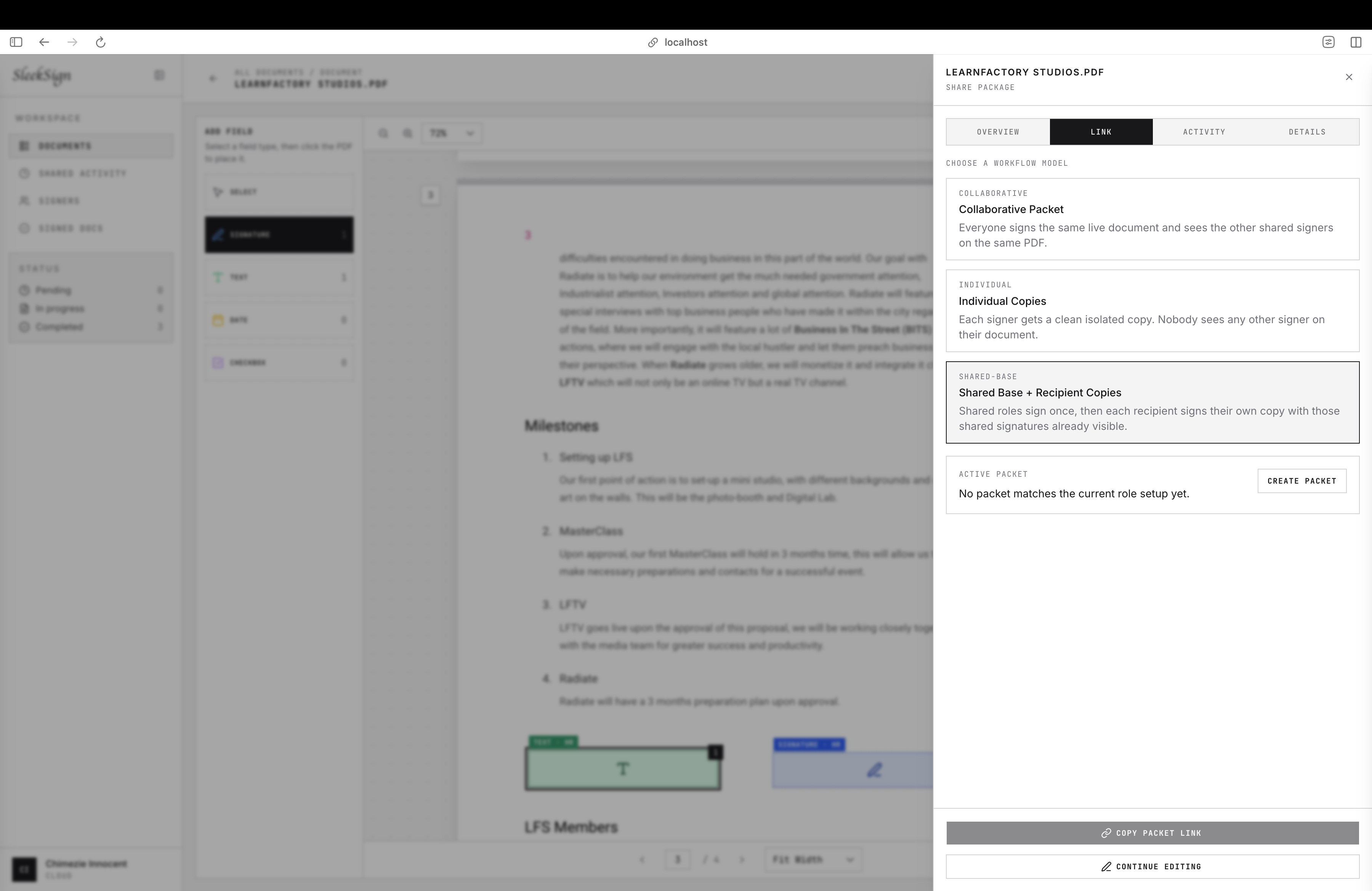
Building SleekSign, I extended the platform for 3 types of signature packets:
-
Collaborative packet (Everyone signs the same live document): HR, employee, and witness work on one packet, so each completed signature becomes visible inside the same shared agreement.
-
Shared-base copies (Company signs once, recipients countersign their own copy): This means that the employer or HR signature is shared across every recipient copy, while each employee or contractor only sees their own private signing section.
-
Individual copies (One template, separate copies for each signer): This means, every recipient signs their own copy, so nobody sees anyone else’s signature, date, or private form data. This is the basic and exactly the problem scenario that led me to build SleekSign.
I later pushed the project beyond collecting marks on a page. When a packet is finalized, SleekSign hashes the PDF, seals the audit chain, creates a canonical verification manifest, and asks Google Cloud KMS to sign its digest with ECDSA P-256/SHA-256. This was also the first time I learned about KMS (considered AWS initially but went with Google because I didnt want to create an AWS account just for it when I'm already using Google for auth).
The resulting receipt records the exact KMS key version used. A public verification flow can then hash an uploaded PDF, rebuild the manifest and audit-chain root, retrieve the public key, and verify the signature locally. If the PDF changes by one byte, verification fails.
The production application reaches KMS through Vercel OIDC and Google Workload Identity Federation, so there is no long-lived service-account JSON key stored in the deployment. There is also no unsigned fallback: if signing, storage, or audit validation fails, finalization fails.
Stack: The application uses SvelteKit, TypeScript, and Tailwind CSS. PDF.js renders documents, pdf-lib creates finalized files, and signature_pad captures drawn signatures. PostgreSQL and Drizzle ORM store workflow state, S3-compatible object storage holds documents, Resend delivers signing links, and Google Cloud KMS protects the signing key.
What I learned
SleekSign taught me to separate what a product can prove from what its interface implies. The system can prove that a particular PDF matches a receipt signed by SleekSign's protected key and that its stored audit chain is intact. That does not automatically prove every signer's real-world identity, and it is not a replacement for a regulated certificate authority.
That boundary matters. Trust grows when the product is precise about its guarantees, fails clearly, and preserves enough evidence for someone else to verify the result.


